Email Segmentation Strategy for DTC Brands
Stop sending the same email to everyone. Learn how to segment your list for higher engagement, better deliverability, and more revenue per send.
- Define the audience with observable behavior
- Use the segment without creating conflicting customer treatment
No prior lesson required.
Why does email segmentation matter?
Segmentation helps make sending decisions more relevant to the customer and safer for sender reputation. A blanket campaign audience can include profiles with very different consent, purchase, and engagement histories; that can make results harder to interpret and can raise risk when persistently unengaged profiles continue receiving routine mail. Use observable behavior to decide who should receive which message and who should enter reactivation instead.
The four-tier ZHS operating model uses highly engaged, warm, cool, and dormant profiles. The default windows are a house starting point, not a universal provider rule, and should be calibrated to the purchase cycle, acquisition source, and reliable behavior available. Use clicks, purchases, and site activity alongside non-inflated open signals, make tiers mutually exclusive, and route dormant profiles through reactivation before suppression.
Klaviyo's guidance supports engaged sending and reputation repair, while the exact definitions and cadence remain an account-level decision. The ZHS tier names and windows below are an operating model to document and calibrate, not a mailbox-provider benchmark.
Sending the same campaign to every eligible profile can hide meaningful differences in relevance, customer value, and engagement risk.
Here is what that costs you.
| Impact Area | What Happens |
|---|---|
| Deliverability | Persistent low engagement can be a signal to investigate alongside complaint and reputation data. |
| Revenue | Relevance can be measured by downstream behavior, not assumed from list size. |
| List Health | Unsubscribes and complaints reveal a mismatch in expectation, audience, or pressure. |
| Sender Reputation | Provider and platform guidance should inform how inactive profiles are treated. |
The fix is simple. Send relevant emails to engaged subscribers, and stop emailing people who stopped listening.
How do you segment an email list by engagement?
Use mutually exclusive windows and reliable signals. In the ZHS model, recent engagement receives the broadest relevant cadence, warm profiles receive selected campaigns, cool profiles receive the highest-value moments, and dormant profiles enter the winback and sunset decision path. Tune the windows after reviewing the purchase cycle and actual engagement quality.
How do you segment an email list by engagement
- 01Tier 1: last 30 daysHighly engaged
Reliable click, purchase, site activity, or non-inflated open signal. Eligible for the broadest relevant cadence.
- 02Tier 2: 31-60 daysWarm
Reliable engagement in the prior window and explicitly excluded from highly engaged. Receive selected strong campaigns.
- 03Tier 3: 61-90 daysCool
Reliable engagement in the prior window and excluded from higher tiers. Receive only the highest-value moments.
- 04Tier 4: 90+ days quietDormant
Exit routine campaigns, enter reactivation, then suppress if reliable inactivity continues.
Structured from the canonical article steps for responsive reading and presenter mode.
Persistent inactivity is a risk signal, not a single universal cause of inbox placement problems. Review it with authentication, consent, complaint, bounce, and sender-reputation data before changing audience rules.
What is a healthy engagement segment distribution?
Track the size and movement of every tier, but do not impose universal list-composition percentages across acquisition sources and purchase cycles. Investigate a shrinking highly engaged cohort, growing dormant cohort, falling clicks, rising complaints, or weak net list growth together.
| Segment | Direction to watch | Question to investigate |
|---|---|---|
| Highly engaged | Stable or growing among comparable acquisition cohorts | Is recent demand falling, or has acquisition mix changed? |
| Warm and cool | Movement into and out of tiers is explainable | Is campaign pressure, message relevance, or seasonality changing? |
| Dormant | Reactivation and suppression outcomes are visible | Are reliable engagement signals declining while dormant profiles grow? |
How to read engagement-tier health
- 01Highly engagedWatch trustworthy demand
Trend clicks, purchases, site activity, conversion, complaints, and unsubscribes instead of trusting Apple-inflated opens alone.
- 02Warm and coolWatch movement between tiers
A growing middle can be normal seasonality or early fatigue; compare acquisition source and campaign pressure.
- 03DormantWatch the reactivation outcome
Measure who returns through reliable action and who remains inactive through the sunset path.
- 04Whole listWatch net quality, not raw size
New consented profiles, reliable engagement, suppression, and revenue contribution should be read together.
There is no universal healthy percentage for each tier. Use stable definitions and trend the same acquisition cohorts over time.
How do you segment by purchase history?
Split buyers into groups with documented business definitions: high-value or high-intent customers, repeat buyers, one-time buyers, and subscribers who have not purchased. The thresholds should reflect the catalog, margin, and purchase cycle. Use early access and exclusive content where it matches customer value; do not assume that every high-value customer should receive the same incentive.
| Segment | Definition | Strategy |
|---|---|---|
| VIPs | Documented value, loyalty, or strategic criteria | Early access, exclusive content, or a value-appropriate benefit |
| Repeat Buyers | Documented repeat-purchase definition | Loyalty recognition and relevant cross-sell |
| One-Time Buyers | Purchased once | Reviews, second purchase incentive |
| Never Purchased | Subscribers only | Social proof, product education, first purchase offer |
Who should get a product launch email?
Plan launches by engagement, purchase history, consent, and the message's relevance. A high-value engaged cohort may merit early access; other engaged groups may receive a standard version; quiet profiles may receive a later reactivation-safe version or be excluded. The sequence should follow the campaign objective and current reputation evidence, not a permanent universal order.
Say you are launching a new product. Here is who gets it, and when.
| Segment | Receive? | Version |
|---|---|---|
| Engaged VIPs | Usually a priority cohort | Early access or a value-appropriate benefit |
| Engaged Repeat Buyers | Often eligible | Standard launch or relevant cross-sell |
| Engaged Non-Buyers | Often eligible | Education, proof, or an appropriate incentive |
| Warm buyers | Review relevance | Shorter or more focused version when justified |
| Warm non-buyers | Review relevance | Simplified version or holdout when justified |
| Cool and dormant profiles | Handle cautiously | Follow reactivation and reputation policy, not a blanket send rule |
What to measure: whether the audience definitions improve relevant engagement and revenue without creating unacceptable complaint, unsubscribe, or deliverability signals.
How do you build engagement segments in Klaviyo?
Use dynamic segment definitions based on reliable behavior. The ZHS default uses clicks, purchases, and site activity as primary signals, with opens treated cautiously because privacy features can inflate them. Create mutually exclusive engagement tiers, combine the tiers you have approved for routine campaigns into a documented "Sendable" audience, then narrow from there using the Klaviyo segmentation playbook.
Highly engaged (ZHS default window):
Clicked Email at least 1 time in the last 30 days
OR Active on Site at least 1 time in the last 30 days
OR Placed Order at least 1 time in the last 30 days
Warm or cool (ZHS default windows):
Clicked Email at least 1 time in the last 90 days
AND NOT Clicked Email at least 1 time in the last 30 days
AND NOT Placed Order at least 1 time in the last 30 days
Sendable Segment:
In Highly Engaged (ZHS) OR In Warm (ZHS) OR In Cool (ZHS)
Use "Sendable" as a documented starting audience only after its definitions and exclusions are approved, then narrow from there for the specific campaign.
What are the most common segmentation mistakes?
Common failure modes are overcomplicating the setup before it can be used, using static segments, ignoring purchase history, and allowing overlapping definitions. Resolve those before adding more segmentation logic.
-
Overcomplicating it. Start with engagement tiers. Add complexity only when the team can use the segment differently.
-
Using static segments. Use dynamic segments that update as customer behavior changes.
-
Ignoring purchase history. At a minimum, separate "has purchased" from "has never purchased."
-
Letting segments overlap. Document the priority so nobody gets counted twice: VIP > Repeat > One-Time > Non-Buyer.
Checklist
Engagement Segments:
- Highly engaged window documented
- Warm and cool windows documented and mutually exclusive
- Dormant policy routed through reactivation before suppression
- Master "Sendable" segment
Purchase Segments:
- VIP definition documented
- Repeat buyer definition documented
- One-time buyer
- Non-purchaser
Operational:
- Default audience set to "Sendable"
- Segment priority documented
- Sunset flow for inactive subscribers
Get Expert Help
Our team audits and rebuilds segmentation for every client we work with. Get this layer right and everything else in email works better.
More patterns to study
Curated creative references for this lesson. Study the mechanism, then adapt it to your own audience, offer, and evidence.
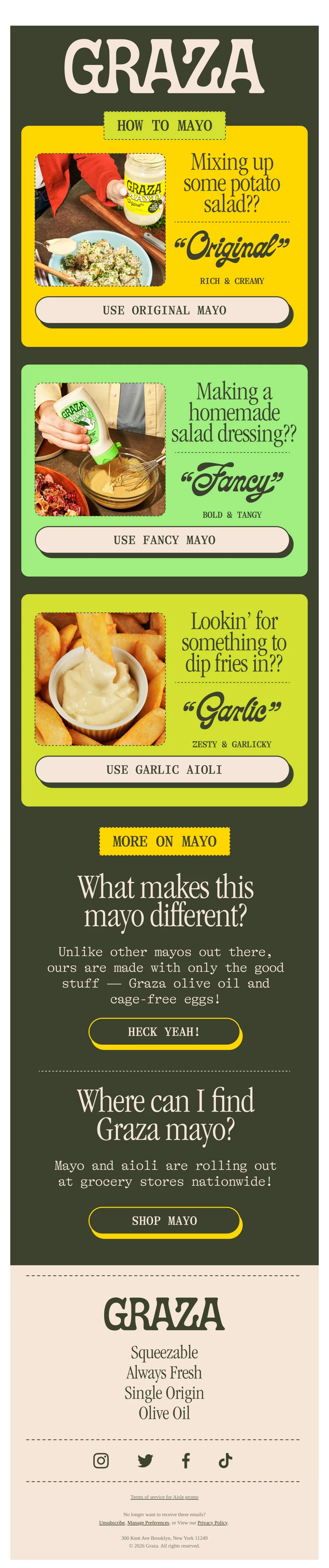
Choose your fighter (mayo)
Pattern: match the right mayo to every dish.
Use it here: A choice-led email becomes more relevant when the choice maps to a real preference or product decision you can store and use responsibly.
Open reference in new tab
🥟 The viral dumpling lasagna
Pattern: viral dumpling lasagna recipe drives product discovery.
Use it here: Use customer behavior or declared interests to guide content selection, not a superficial personalization token that does not change the message.
Open reference in new tabCreative and design curation only. These are role references, not reported revenue, conversion, or a promise that the exact tactic will transfer unchanged.
Need help implementing this?
We build and manage complete email & SMS programs for DTC brands. Get a custom plan for your brand.
Get Your Free Audit + Gameplan